
Ruxi
Install Windows from a USB stick with a step-by-step guide, even if you know nothing about computers.
Windows 10 and 11, 64-bit · v1.4.4 · 12 Oct 2026
Windows 10 and 11, 64-bit · There is no Mac version. · v1.4.4 · 12 Oct 2026
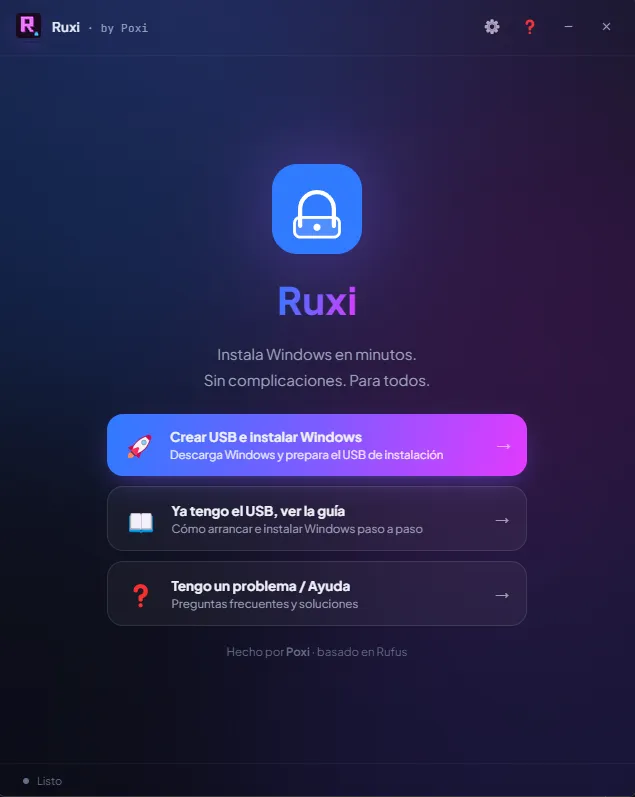
What it does
Installer or portable?
Installer · recommended
Installs like any other app, with a shortcut and uninstall from Windows. Updates itself when a new version is out.
Portable
A single file you open without installing anything. Great for a USB stick or a PC that is not yours.
How to install it
- Click Download and open the file when it finishes.
- If Windows warns you, click More info and then Run anyway. Why does it show up?
- Follow the installer. You will be ready in a minute.
Why it is safe
Check the file
Its SHA256 fingerprint must match the one of the file you download.
6c80eb4849f8ced6d6697a7843a2d023ed785aea8c16d4d4ccdddd2f1fa1b14bWhat's new in v1.4.4
Novedades de la v1.4.4
🎨 Icono nuevo
- Ruxi pasa a formar parte de la suite de programas de Poxi con un icono propio: una R pixelada con un pendrive.
- Nítido en cualquier tamaño (de 16 a 256 px): barra de tareas, escritorio, instalador y ventana de la app.
El motor de creación de USB no cambia: esto es solo el icono. Todo sigue igual de seguro.
📥 Descarga
Ruxi-Setup-1.4.4.exe: instalador, recomendado. Se actualiza solo.Ruxi-Portable.exe: portable, sin instalar nada.
ℹ️ Si Windows enseña el aviso azul de SmartScreen: Más información → Ejecutar de todas formas.
What's new in v1.4.4
🎨 New icon
- Ruxi joins the Poxi app suite with its own icon: a pixel-art R with a USB stick.
- Sharp at every size (16 to 256 px): taskbar, desktop, installer and app window.
The USB creation engine is unchanged: this is only the icon. Everything stays just as safe.
Technical details
| Version | v1.4.4 · 12 Oct 2026 |
| Installer | Ruxi-Setup-1.4.4.exe · 62 MB |
| Portable | Ruxi-Portable.exe · 61 MB |
| SHA256 | 6c80eb4849f8ced6d6697a7843a2d023ed785aea8c16d4d4ccdddd2f1fa1b14b |
| License | GPL-3.0 |
| Source code | github.com/PoxiiTV/Ruxi-Custom-Rufus |
When it finishes, open it. If Windows warns you, click More info and then Run anyway. Why does it show up?
When it finishes, open the .dmg and drag the app to Applications. If macOS blocks it, go to System Settings → Privacy & Security → Open Anyway. Why does it show up?