
PoxiTerminal
A fast terminal with SSH, SFTP and your Claude Code or Codex sessions in a single window.
Windows 10 and 11, 64-bit · v0.4.1 · 15 Oct 2026
Also for Mac: macOS 14 or later · Apple Silicon (M1 or newer).
macOS 14 or later · Apple Silicon (M1 or newer) · v0.4.1 · 15 Oct 2026
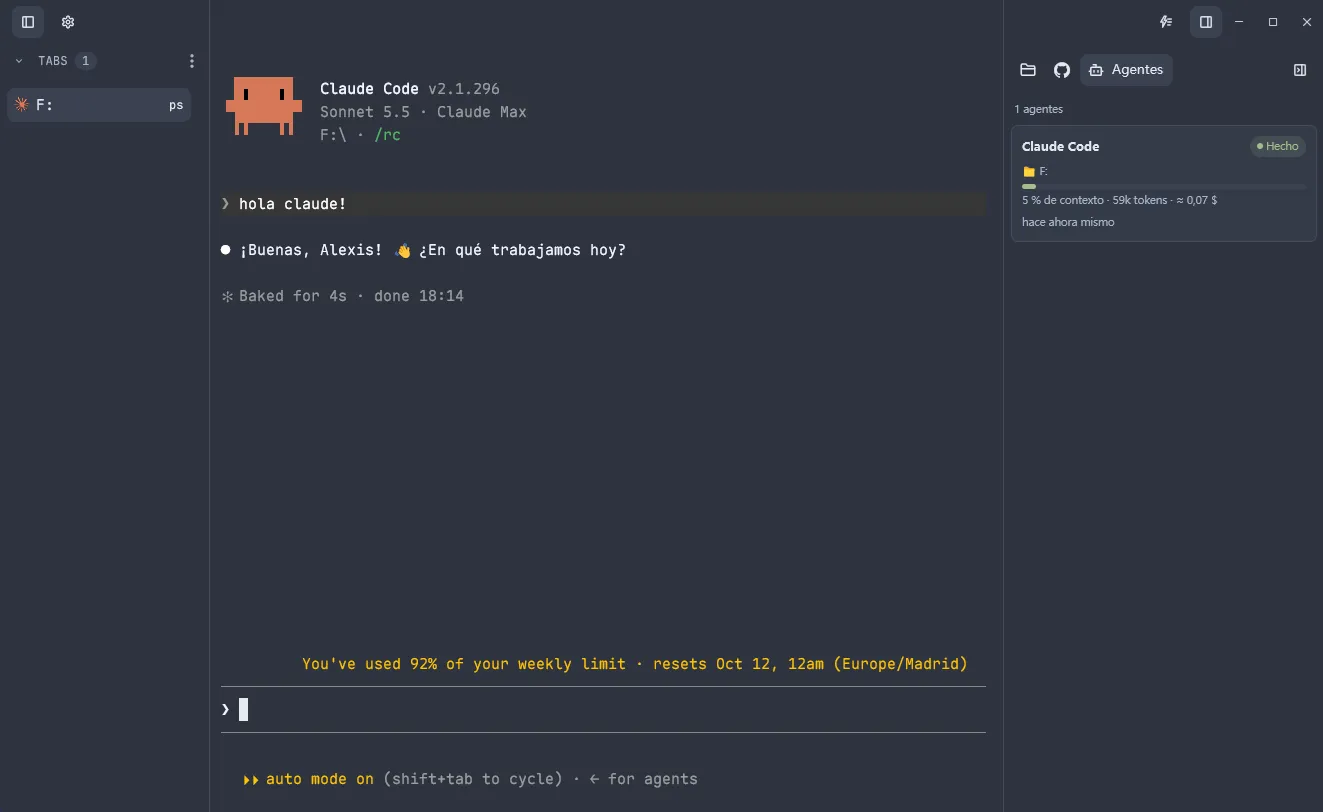
What it does
Installer or portable?
Installer · recommended
Installs like any other app, with a shortcut and uninstall from Windows. Updates itself when a new version is out.
Portable (.zip)
A .zip you extract and open without installing anything. Great for a USB stick or a PC that is not yours.
How to install it
- Click Download and open the file when it finishes.
- If Windows warns you, click More info and then Run anyway. Why does it show up?
- Follow the installer. You will be ready in a minute.
- Click Download and open the .dmg when it finishes.
- Drag the app to Applications and open it.
- If macOS blocks it, go to System Settings → Privacy & Security → Open Anyway. You only need to do it once. Why does it show up?
Why it is safe
Check the file
Its SHA256 fingerprint must match the one of the file you download.
e407568a345781fcc6ed464e4550b4fc931e513f2f6ab4ba02dd000bc627cc52What's new in v0.4.1
🇪🇸 Español
Tarjeta Pool renovada en el centro de control de IA (Ctrl+Shift+A), para quien usa el módulo Pool con su servidor Fifty. Si no usas el módulo, esta versión no cambia nada para ti.
- Lo que te queda, en grande, por cada ventana (5 h y semana), con lo que llevas gastado y tu nivel (Normal, Aviso, Importante, Crítico, Agotado).
- Barra partida: un tramo por persona, proporcional a su parte, relleno con lo que ha gastado. En modo compartido, una sola bolsa.
- Lo que le queda a la otra persona, los préstamos que das o recibes y cuánto falta para que se reinicie cada ventana.
- Avisos: si dos equipos miden cuentas de Claude distintas, si un reloj está desajustado o si hay datos pendientes de enviar.
- El servidor del módulo pasa a llamarse Fifty.
| Archivo | Para qué |
|---|---|
PoxiTerminal-v0.4.1-windows-x64-setup.exe |
Instalador. Accesos directos, «Abrir en PoxiTerminal» en el menú contextual y actualizaciones automáticas |
PoxiTerminal-v0.4.1-windows-x64.zip |
Portable. Descomprime y ejecuta poxiterminal.exe |
PoxiTerminal-v0.4.1-macos-arm64.dmg |
Mac con Apple Silicon (M1 o posterior, macOS 14+). Ábrelo y arrastra PoxiTerminal a Aplicaciones |
SHA256SUMS |
Huellas para comprobar los archivos |
🍎 Ahora también en Mac
Primera versión para macOS, con todo en castellano igual que en Windows: pestañas, paneles, SSH, SFTP, panel de Git y centro de control de IA.
- Teclado español de Mac:
~ @ # | \ [ ] { }se escriben con ⌥ como en cualquier app. - Tab como en Windows:
cd desk+ Tab completa aDesktopsin distinguir mayúsculas. - Barra de menús en castellano (PoxiTerminal, Archivo, Edición, Visualización y Ventana), con el atajo con
⌘de cada opción:⌘T,⌘C,⌘V,⌘F… - «Abrir en PoxiTerminal» desde el Finder: dentro del
.dmgestá Abrir en PoxiTerminal.workflow; doble clic para instalarlo y aparece al hacer clic derecho en una carpeta → Acciones rápidas. - Ligero en reposo: ~1 % de CPU con la ventana a la vista y ~0,3 % con la ventana tapada.
- Para compilarlo en Mac basta con Rust y las Command Line Tools:
./build-mac.sh.
⚠️ Como la app aún no está firmada por Apple, macOS la bloquea la primera vez. Ábrela, cierra el aviso y ve a Ajustes del Sistema → Privacidad y seguridad → Abrir igualmente.
El
.dmgse ha compilado desde el commit187d818demaster(mismo código que la 0.4.1 más la adaptación a Mac).
🇬🇧 English
Revamped Pool card in the AI control center (Ctrl+Shift+A), for people using the Pool module with their Fifty server. If you don't use the module, nothing changes for you.
- What you have left, big, for each window (5 h and week), with what you have used and your level (Normal, Warning, Important, Critical, Exhausted).
- Split bar: one segment per person, sized by their share and filled with what they used. In shared mode, a single pool.
- What the other person has left, the loans you give or receive and how long until each window resets.
- Warnings: when two machines measure different Claude accounts, when a clock is off or when data is waiting to be sent.
- The module's server is now called Fifty.
🍎 Now on the Mac too
First macOS release (Apple Silicon, macOS 14+), fully in Spanish like on Windows. Download PoxiTerminal-v0.4.1-macos-arm64.dmg, open it and drag PoxiTerminal to Applications. The Spanish Mac keyboard works with ⌥ (~ @ # | \) Tab completion ignores case (cd desk → Desktop), there is a Spanish menu bar, ⌘F searches the scrollback and the .dmg includes an "Abrir en PoxiTerminal" Finder Quick Action.
⚠️ Not signed by Apple yet: the first time, open it, close the warning and go to System Settings → Privacy & Security → Open Anyway. Built from commit
187d818onmaster.
Technical details
| Version | v0.4.1 · 15 Oct 2026 |
| Installer | PoxiTerminal-v0.4.1-windows-x64-setup.exe · 32 MB |
| Portable | PoxiTerminal-v0.4.1-windows-x64.zip · 35 MB |
| Mac installer | PoxiTerminal-v0.4.1-macos-arm64.dmg · 38 MB |
| SHA256 | e407568a345781fcc6ed464e4550b4fc931e513f2f6ab4ba02dd000bc627cc52 |
| License | GPL-3.0 |
| Source code | github.com/PoxiiTV/PoxiTerminal |
When it finishes, open it. If Windows warns you, click More info and then Run anyway. Why does it show up?
When it finishes, open the .dmg and drag the app to Applications. If macOS blocks it, go to System Settings → Privacy & Security → Open Anyway. Why does it show up?