
PoxiLauncher
Play Minecraft with your friends, no hassle: the same mods for everyone, the group world in the cloud and no fighting with the router.
Windows 10 and 11, 64-bit · v0.7.0 · 9 Oct 2026
Also for Mac: macOS 12 or later · Apple Silicon and Intel.
macOS 12 or later · Apple Silicon and Intel · v0.7.0 · 9 Oct 2026
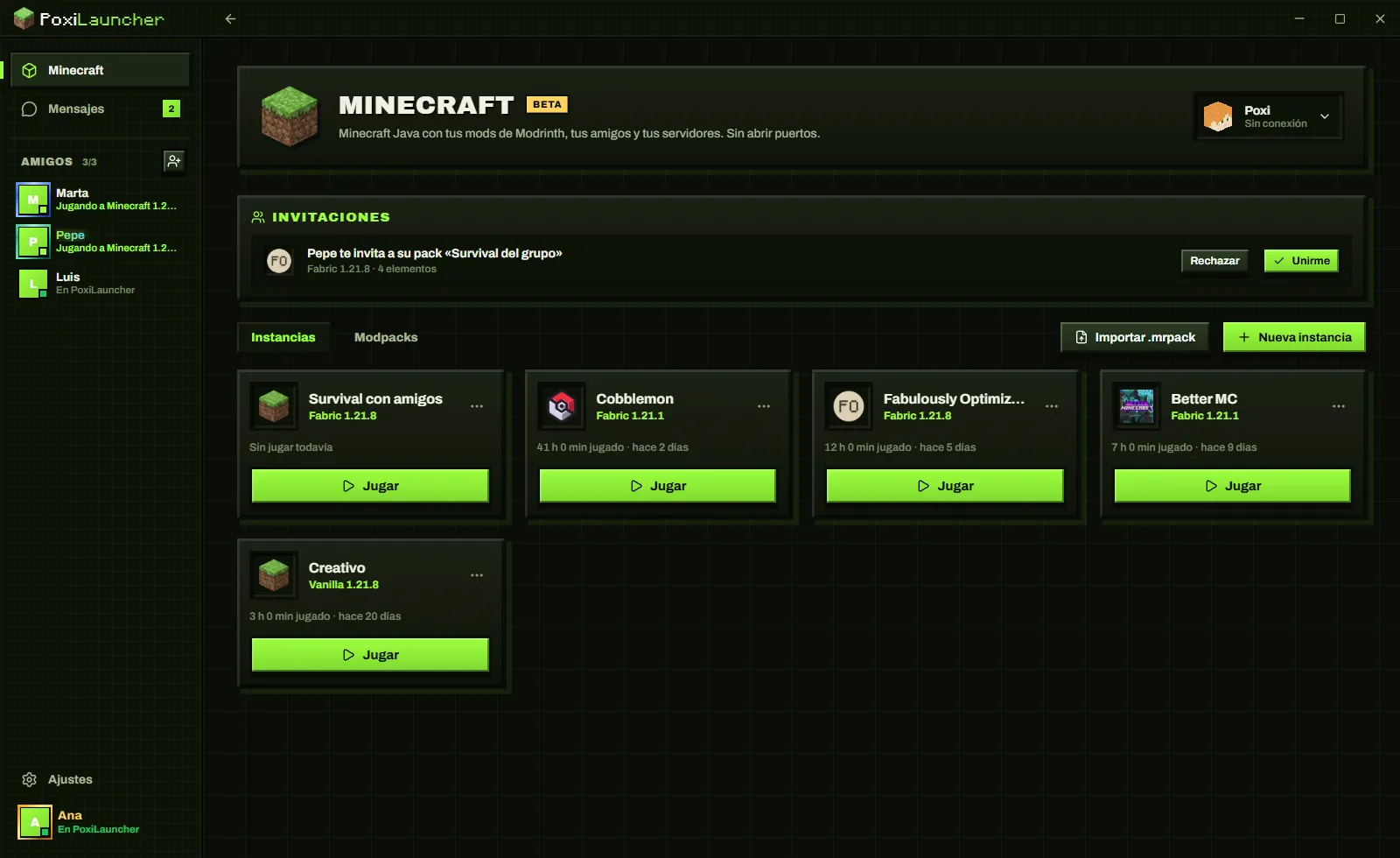
What it does
Installer or portable?
Installer · recommended
Installs like any other app, with a shortcut and uninstall from Windows. Updates itself when a new version is out.
Portable
A single file you open without installing anything. Great for a USB stick or a PC that is not yours.
How to install it
- Click Download and open the file when it finishes.
- If Windows warns you, click More info and then Run anyway. Why does it show up?
- Follow the installer. You will be ready in a minute.
- Click Download and open the .dmg when it finishes.
- Drag the app to Applications and open it.
- If macOS blocks it, go to System Settings → Privacy & Security → Open Anyway. You only need to do it once. Why does it show up?
On Apple-chip Macs it plays Minecraft 1.19 or later; on Intel Macs, every version. The in-game menu, screenshots and clips are not there yet, and it does not update itself: it tells you about the new version and opens its download.
Why it is safe
Check the file
Its SHA256 fingerprint must match the one of the file you download.
5759ac125629da68f5a9a0d8eab064719042b1ec2bc23c6c54ec89437ed5f2e7What's new in v0.7.0
🇪🇸 Español
- 📦 Trae tus instancias: PoxiLauncher encuentra solo tus instancias del launcher oficial de Minecraft, CurseForge, Prism Launcher y Modrinth App y te las trae con un clic: versión, loader, mods, resource packs, shaders, configuración, opciones, servidores y mundos. Tus launchers de antes no se tocan: todo se copia.
- 🧠 Sin crasheos al importar: los mods que no son para la versión de una instancia se desactivan (no se borran) y te lo avisa. Y si varios perfiles del launcher oficial comparten carpeta, te lo dice para que no copies lo mismo dos veces.
- 👋 La primera vez que abres PoxiLauncher te ofrece traerte lo que encuentre.
- 🔢 Los tamaños (MB, GB) salen en el formato de tu idioma.
- 🐛 Arreglado: una instancia que se estaba creando (al importar un
.mrpack, por ejemplo) podía desaparecer a mitad.
🍎 Ahora también en Mac
Primera versión para Mac (macOS 12+): PoxiLauncher-0.7.0-arm64.dmg para los Mac con chip de Apple (M1 o posterior) y PoxiLauncher-0.7.0-x64.dmg para los Mac con Intel. Ábrelo y arrastra PoxiLauncher a Aplicaciones.
- Cuenta de Microsoft o sin conexión, instancias, mods de Modrinth, packs, amigos, chat y «Unirme», igual que en Windows.
- Con el Java oficial de Mojang para Mac. En los Mac con chip de Apple, Minecraft 1.19 o posterior (las anteriores aún no funcionan en ese chip); en los Intel, todas las versiones.
- Aún no trae el menú dentro del juego, las capturas ni los clips.
- No se actualiza sola: cuando haya versión nueva para Mac, te avisa y abre su descarga.
⚠️ Como la app aún no está firmada por Apple, macOS la bloquea la primera vez. Ábrela, cierra el aviso y ve a Ajustes del Sistema → Privacidad y seguridad → Abrir igualmente.
🇬🇧 English
- 📦 Bring your instances: PoxiLauncher finds your instances from the official Minecraft launcher, CurseForge, Prism Launcher and Modrinth App and brings them over in one click: version, loader, mods, resource packs, shaders, config, options, servers and worlds. Your old launchers are left untouched: everything is copied.
- 🧠 No crashes after importing: mods that aren’t made for an instance’s version are disabled (not deleted) and you’re told about it. And if several official launcher profiles share a folder, it lets you know so you don’t copy the same thing twice.
- 👋 The first time you open PoxiLauncher, it offers to bring over whatever it finds.
- 🔢 Sizes (MB, GB) follow your language’s number format.
- 🐛 Fixed: an instance being created (for example when importing a
.mrpack) could disappear halfway.
🍎 Now on the Mac too
First release for Mac (macOS 12+): PoxiLauncher-0.7.0-arm64.dmg for Apple-chip Macs (M1 or later) and PoxiLauncher-0.7.0-x64.dmg for Intel Macs. Open it and drag PoxiLauncher to Applications. Microsoft or offline accounts, instances, Modrinth mods, packs, friends, chat and "Join", like on Windows. Plays Minecraft 1.19 or later on Apple-chip Macs and every version on Intel Macs. The in-game menu, screenshots and clips aren't there yet, and it doesn't update itself: it tells you about new Mac versions and opens the download.
⚠️ Not signed by Apple yet: the first time, open it, close the warning and go to System Settings → Privacy & Security → Open Anyway.
Instalador (Setup, 1 MB): baja el resto y se actualiza solo · Installer: downloads the rest and updates itself.
Portable: sin instalar · no install needed.
Mac: arm64 para chip de Apple, x64 para Intel · arm64 for Apple chips, x64 for Intel.
Technical details
| Version | v0.7.0 · 9 Oct 2026 |
| Installer | PoxiLauncher-Setup-0.7.0.exe · 0.6 MB |
| Portable | PoxiLauncher-Portable-0.7.0.exe · 97 MB |
| Mac installer | PoxiLauncher-0.7.0-arm64.dmg · 125 MB |
| SHA256 | 5759ac125629da68f5a9a0d8eab064719042b1ec2bc23c6c54ec89437ed5f2e7 |
| License | PolyForm Noncommercial 1.0.0 |
| Source code | github.com/PoxiiTV/PoxiLauncher |
When it finishes, open it. If Windows warns you, click More info and then Run anyway. Why does it show up?
When it finishes, open the .dmg and drag the app to Applications. If macOS blocks it, go to System Settings → Privacy & Security → Open Anyway. Why does it show up?