
PoxiISO
One USB with all your ISOs, built on Ventoy and in Spanish: copy Windows and Linux images and pick which one to boot.
Windows 10 and 11, 64-bit · v1.0.0 · 13 Oct 2026
Also for Mac: macOS 13 or later · Apple Silicon and Intel.
macOS 13 or later · Apple Silicon and Intel · v1.0.0 · 13 Oct 2026
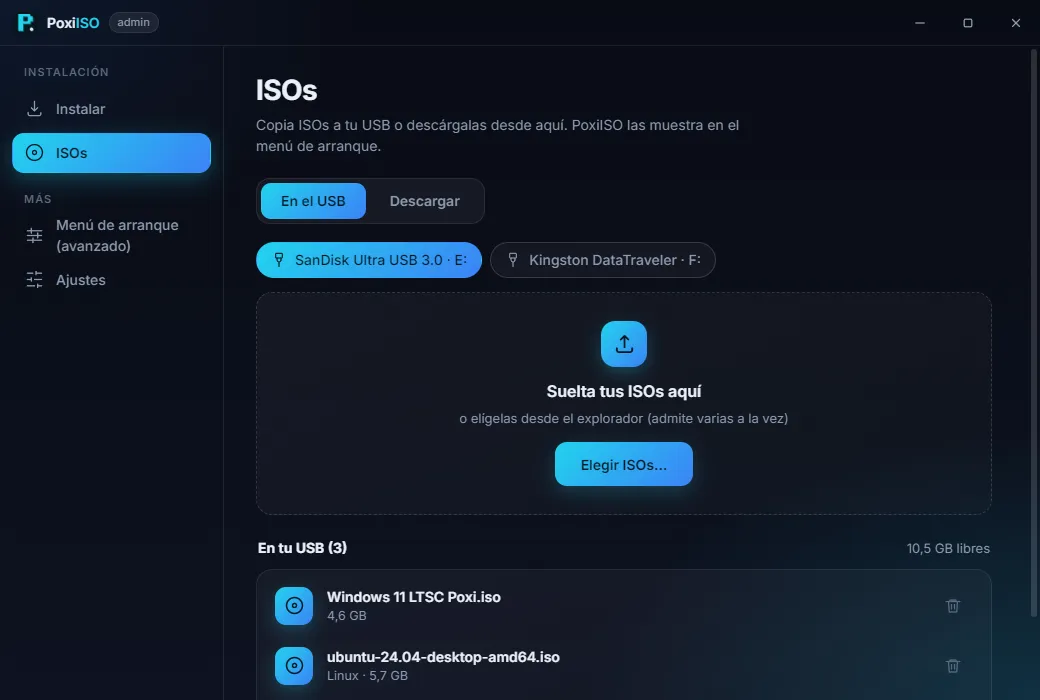
What it does
Installer or portable?
Installer · recommended
Installs like any other app, with a shortcut and uninstall from Windows.
Portable
A single file you open without installing anything. Great for a USB stick or a PC that is not yours.
How to install it
- Click Download and open the file when it finishes.
- If Windows warns you, click More info and then Run anyway. Why does it show up?
- Follow the installer. You will be ready in a minute.
- Click Download and open the .dmg when it finishes.
- Drag the app to Applications and open it.
- If macOS blocks it, go to System Settings → Privacy & Security → Open Anyway. You only need to do it once. Why does it show up?
This is a beta: tested with virtual disks and booting in a virtual machine (UEFI and BIOS), not yet with a real USB. It asks for your Mac password to write to the USB. There is no NTFS and no advanced configurator on Mac.
Why it is safe
Check the file
Its SHA256 fingerprint must match the one of the file you download.
c57f7ab7a25328c21410842c0be15c35ffbdf31c96c98b89bbfd27e379a89815What's new in v1.0.0
🇪🇸 Español
- 💿 Un USB con todas tus ISOs: instalas PoxiISO una vez en el pendrive y a partir de ahí solo copias ISOs. Al encender el PC eliges cuál arrancar: Windows, Linux, herramientas de rescate… todo en el mismo USB.
- 🛡️ Instalar sin sustos: te dice qué USB es y cuánto ocupa, y hay que mantener pulsado para confirmar el borrado. Actualizar no toca tus ISOs. El USB queda con el nombre PoxiISO, su icono y las carpetas técnicas ocultas.
- ⬇️ Más de 60 sistemas para descargar: Windows, Ubuntu, Debian y Kali a mano, y el resto con buscador: Linux de todo tipo (Mint, Zorin OS, Pop!_OS, Fedora…), gaming (Bazzite, CachyOS, Nobara), rescate (Hiren's BootCD PE, Rescuezilla, GParted, Clonezilla), servidores (Proxmox, TrueNAS, Rocky, AlmaLinux) y más.
- ✅ Descargas verificadas: casi todas se comprueban con su SHA-256 oficial, siempre la última versión, se reanudan si se corta la conexión y se copian solas al USB.
- 🔗 Tu propio enlace: pega cualquier enlace a una ISO, también los de Google Drive.
- 🎨 Menú de arranque propio: oscuro, en español, con un icono para cada sistema y barra de desplazamiento. En 1080p y en pantallas 4:3.
- 👀 Vista previa: mira desde la app cómo se verá el menú al arrancar, con tus ISOs y sus iconos.
- 🧩 Configurador avanzado traducido entero y con una explicación en cada pantalla: alias, contraseñas, persistencia, instalaciones desatendidas… Se abre desde la app sin ventanas en inglés.
- 🌍 Español o inglés: la app, el menú de arranque y el configurador, en el idioma que elijas en Ajustes.
- 🍎 Ahora también en Mac (Apple Silicon e Intel, macOS 13+): prepara desde el Mac un USB que arranca en cualquier PC. Ventoy no tiene instalador para Mac, así que PoxiISO trae el suyo propio y escribe el USB exactamente como lo hace Ventoy.
- 🛡️ Solo USB externos: antes de escribir, el instalador comprueba él mismo que el disco es un USB externo y extraíble, el mismo que elegiste, y nunca el disco del Mac. Te pide la contraseña del Mac para escribir en el USB.
- 🔁 Actualizar también desde el Mac, sin tocar tus ISOs. Con o sin Secure Boot, exFAT o FAT32, MBR o GPT.
- ⚠️ Beta: probado con discos virtuales y arrancando en máquina virtual (UEFI y BIOS), aún no con un USB real. En Mac no hay NTFS ni configurador avanzado.
- ⚙️ En Mac usa Electron 44: Apple ha bloqueado en macOS la versión que usa Windows.
🇬🇧 English
- 💿 One USB with all your ISOs: install PoxiISO on the pen drive once and from then on just copy ISOs. When the PC starts you pick which one to boot: Windows, Linux, rescue tools… all on the same USB.
- 🛡️ Install without scares: it tells you which USB it is and how big, and you have to hold the button to confirm the erase. Update leaves your ISOs alone. The USB ends up named PoxiISO, with its icon and the technical folders hidden.
- ⬇️ Over 60 systems to download: Windows, Ubuntu, Debian and Kali at hand, and the rest with search: all kinds of Linux (Mint, Zorin OS, Pop!_OS, Fedora…), gaming (Bazzite, CachyOS, Nobara), rescue (Hiren's BootCD PE, Rescuezilla, GParted, Clonezilla), servers (Proxmox, TrueNAS, Rocky, AlmaLinux) and more.
- ✅ Verified downloads: almost all are checked against their official SHA-256, always the latest version, they resume if the connection drops and are copied to the USB automatically.
- 🔗 Your own link: paste any link to an ISO, including Google Drive links.
- 🎨 Custom boot menu: dark, with an icon for each system and a scrollbar. At 1080p and on 4:3 screens.
- 👀 Preview: see from the app how the boot menu will look, with your ISOs and their icons.
- 🧩 Advanced configurator fully translated, with an explanation on every screen: aliases, passwords, persistence, unattended installs… It opens from the app with no English-only windows.
- 🌍 Spanish or English: the app, the boot menu and the configurator, in the language you choose in Settings.
- 🍎 Now on Mac too (Apple Silicon and Intel, macOS 13+): prepare a USB that boots any PC from your Mac. Ventoy has no Mac installer, so PoxiISO ships its own and writes the USB exactly the way Ventoy does.
- 🛡️ External USB drives only: before writing, the installer itself checks that the disk is an external, removable USB drive, the one you picked, and never the Mac's own disk. It asks for your Mac password to write to the USB.
- 🔁 Update from the Mac as well, keeping your ISOs. With or without Secure Boot, exFAT or FAT32, MBR or GPT.
- ⚠️ Beta: tested with virtual disks and booting in a virtual machine (UEFI and BIOS), not yet with a real USB. No NTFS and no advanced configurator on Mac.
- ⚙️ The Mac build uses Electron 44: Apple has blocked the version the Windows build uses on macOS.
Instalador (Setup, 0,7 MB): baja el resto y se actualiza solo · Installer: downloads the rest and updates itself.
Portable: sin instalar · no install needed.
Pide administrador porque prepara el USB · Asks for administrator rights because it prepares the USB.
Mac (.dmg, beta): arm64 para Apple Silicon, x64 para Intel · arm64 for Apple Silicon, x64 for Intel.
Sin firmar por Apple: la primera vez, Ajustes del Sistema → Privacidad y seguridad → Abrir igualmente · Not signed by Apple: the first time, System Settings → Privacy & Security → Open Anyway.
Technical details
| Version | v1.0.0 · 13 Oct 2026 |
| Installer | PoxiISO-Setup-1.0.0.exe · 0.7 MB |
| Portable | PoxiISO-Portable-1.0.0.exe · 84 MB |
| Mac installer | PoxiISO-1.0.0-mac-arm64.dmg · 139 MB |
| SHA256 | c57f7ab7a25328c21410842c0be15c35ffbdf31c96c98b89bbfd27e379a89815 |
| License | GPL-3.0 |
| Source code | github.com/PoxiiTV/PoxiISO |
When it finishes, open it. If Windows warns you, click More info and then Run anyway. Why does it show up?
When it finishes, open the .dmg and drag the app to Applications. If macOS blocks it, go to System Settings → Privacy & Security → Open Anyway. Why does it show up?